RTD MyRide
- 4.1
- Rating
- 500.00K
- Installs
- Free
- Price

 Analysis by App-foxy
RTD MyRide is the kind of travel app I appreciate most when I am already in a hurry. Its central idea is simple: use the phone as part of the riding process instead of treating it only as a timetable viewer. That focus makes it especially relevant to people using Regional Transportation District services in Denver, whether they ride every day, commute occasionally, or are visiting and do not want to work out the payment process at a station or stop.
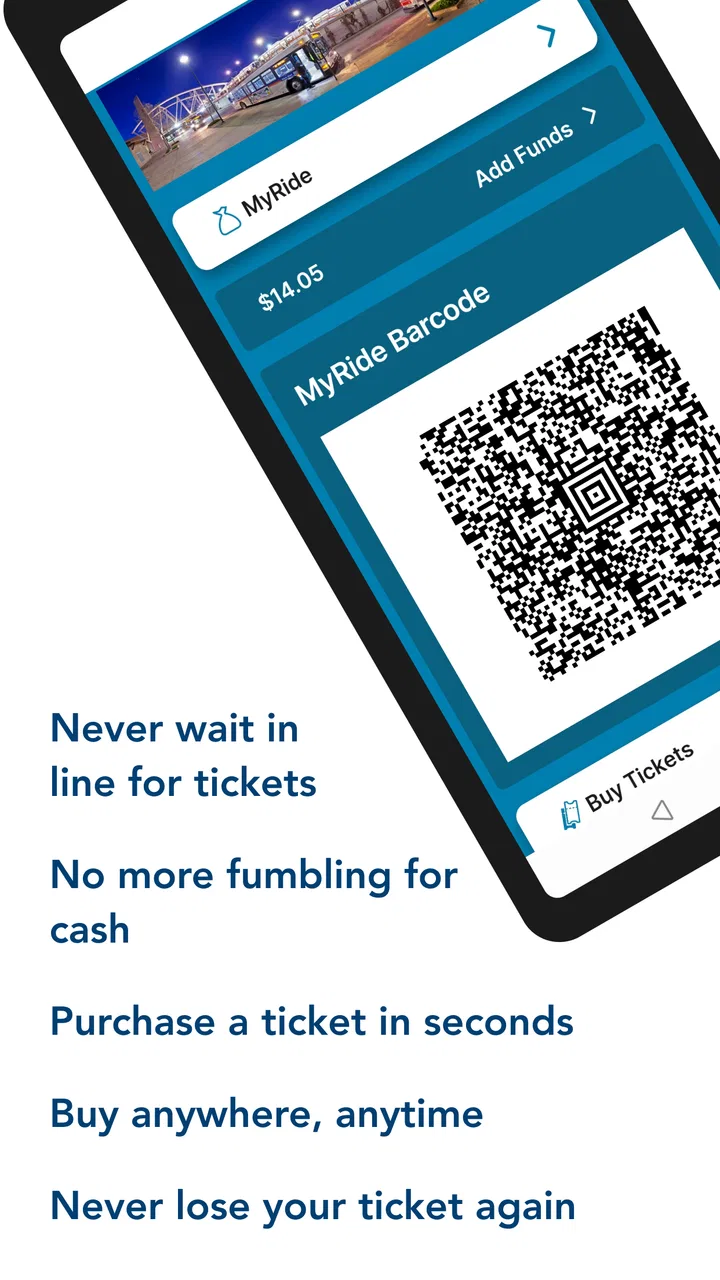
After spending time with it, I see the app less as a general travel planner and more as a practical bridge between checking a trip and actually boarding. The scan-and-ride workflow is the important capability here. It can reduce the awkward pause that often happens when a passenger has to search for a ticket, find the right screen, or wonder whether a digital fare is ready to use. That sounds like a small improvement, but small delays matter when a bus is waiting at the curb.
RTD MyRide is free, aimed at Everyone, and comes from Regional Transportation District, Denver CO. It belongs in the Travel & Local category, and its current version is 7.9.6. The app has been available since November 1, 2017, supports Android 8.0 and later, and has passed over 500 thousand installs. Those details give it the feel of an established local transit tool rather than a new experiment.
You May Also Like

 Blood Strike: 2.5 Anniversary
Blood Strike’s Loadouts Turn Every Drop Into a Tactical Gamble
A close look at Blood Strike’s custom loadouts: how fast access to signature weapons reshapes its battle royale rhythm, rewards preparation, and narrows the gap between fights.

 Pandora - Music & Podcasts
Pandora’s Music Is Easy to Start, but Harder to Recover
Pandora’s strength is its low-effort path from a seed to a station. Its weak spot is how much confidence it asks you to place in connection, setup, and quiet recovery.

 8 Ball Pool
8 Ball Pool Is Built on Rivalries, Rematches, and Routine
A close look at the rivalries, rematches, shared routines, and unanswered safety questions that turn a quick pool match into a persistent mobile community.

 Samsung Music
Samsung Music’s Quiet Strength Is Playing What You Already Own
Its reach comes less from spectacle than from dependable access to a personal library. That simplicity is both the app’s strongest retention engine and its ceiling.

 AccuWeather: Weather Radar
AccuWeather Review: A Quick, Clear Forecast for Everyday Decisions
For everyday plans, the best forecast is the one you can understand quickly. AccuWeather makes rain timing, radar, and local conditions easy to act on, with a few trade-offs.

 Hill Climb Racing
Why Hill Climb Racing Still Turns Crashes Into One More Run
A tiny car, a bumpy hill and one more upgrade: Hill Climb Racing keeps resurfacing because its simple chaos makes every near-miss feel personal.
More From Our News Desk



Why the scan-and-ride capability matters
The most useful way to understand this app is to focus on the moment immediately before boarding. A conventional transit app may tell me where to go, while a paper ticket or a separate payment method handles the fare. RTD MyRide brings more of that journey into one place. I can prepare for the ride on my phone and use the resulting digital process when I board, rather than switching between unrelated tools.
That is particularly helpful when I am carrying a bag, walking toward a stop, or trying to keep up with a group. The advantage is not that the app makes public transportation magically faster. It removes one layer of friction from a routine that already involves watching the arrival, checking the route, and getting to the correct boarding point.
In my experience, the best apps in this category are not necessarily the ones with the largest number of screens. They are the ones that make an important action obvious at the right time. RTD MyRide’s value comes from making the phone useful at the point of entry, not merely informative several minutes earlier.
There is also a psychological benefit. When I know my fare process is ready before the vehicle arrives, I can concentrate on confirming the route and boarding safely. That is more comfortable than standing beside a stop while trying to complete several steps after the doors open. For regular riders, the time saved per trip may feel modest, but the reduced mental load can be significant over a week.
Preparing before leaving home
I would set up the app before walking to the stop, not while the bus is already pulling in. That is the first practical lesson. A calm setup gives me time to read the available options, check that the phone is functioning normally, and understand what I need to present or scan when I board.
This also makes the app easier for occasional riders. A visitor may not know the local fare routine, while a resident may simply have forgotten how the process works after a long break from transit. Preparing in advance avoids turning the first boarding attempt into a public troubleshooting session.
A useful habit is to open the app before entering a busy station or approaching a crowded stop. I prefer to complete the important steps while I still have a stable grip on my phone and enough attention to read the screen. Once I am moving through a queue, convenience depends as much on preparation as on the application itself.
What the workflow feels like during a trip
The scan-and-ride approach is most effective when I treat it as a boarding routine rather than an occasional feature. I check the trip, make sure the relevant fare or riding screen is ready, and keep the phone accessible. When it is time to board, I follow the on-screen action instead of searching through unrelated menus.
That sequence is easier to remember than a complicated set of instructions, but it still requires attention. A phone with a dim screen, an app left on the wrong page, or a rushed attempt at the door can make a simple process feel less smooth. The app helps, but it does not remove the need for basic preparation.
I would also avoid assuming that every transit question is solved by the scan itself. Knowing which vehicle to board, where to transfer, and when to get off remains part of the rider’s responsibility. RTD MyRide is useful because it supports the fare-and-boarding moment; it should not be treated as a substitute for paying attention to the route.
A realistic Denver travel scenario
Imagine leaving work with a small bag and heading toward an RTD stop while checking the next available trip. The bus is close enough that there is no time to visit a ticket machine, but there is enough time to prepare on the phone. I would open RTD MyRide, make sure the riding action is ready, and keep the display available as I approach the vehicle.
When the bus arrives, I am not standing in the doorway trying to remember where a paper ticket is stored. I can complete the scan-and-ride action as part of boarding and move on. If I am meeting a friend, this is also easier to explain: instead of describing a separate payment routine, I can tell them to prepare their ride in the same local app.
The benefit becomes clearer during a transfer. Transfers are often where casual riders feel least confident because they have already left the first vehicle and need to repeat the process quickly. Having the same app available for the next boarding step gives the journey a consistent rhythm. It does not guarantee a smooth transfer if the connection is tight, but it reduces one avoidable source of hesitation.
Where it beats the usual alternatives
The obvious alternative is a physical ticket or a station-based purchase. Those options can be perfectly adequate, especially for someone who rides only once and does not want another app on a phone. Their weakness is that they may require an extra stop before boarding, and a misplaced ticket is harder to recover from than a digital routine already associated with the rider’s phone.
Another alternative is using a general mapping app for directions and then handling payment separately. I often use general maps for broad navigation, but they are not always the best place for a local riding workflow. RTD MyRide has a narrower purpose, and that specialization is its strength when the question is not merely “how do I get there?” but “how do I get on this RTD service with the least fuss?”
For a visitor comparing it with a citywide navigation tool, I would put the distinction this way: a general app may be better for comparing walking, driving, cycling, and multiple transit agencies, while RTD MyRide is the more focused choice for the RTD boarding experience. Using both can make sense. One can help with the overall route, and the local app can handle the local ride action.
The trade-off is that a focused agency app may feel less useful outside its network. If my trip involves several transportation providers or a complicated regional itinerary, I would rather start with a broader planner. Once the journey centers on RTD, however, the dedicated workflow becomes more valuable than a generic map screen.
The friction I noticed
The app’s narrow focus is also its main limitation. Someone expecting a complete travel companion may find it less satisfying than a broader navigation service. The experience is strongest when the user already knows that RTD is the relevant provider and wants a direct way to manage the ride. It is not the first tool I would reach for when I am comparing every possible way to cross a city.
There is also the normal vulnerability of phone-based travel. A dead battery, a damaged screen, or a phone that is difficult to access can turn a convenient digital process into a stressful one. I would not rely on any mobile fare system without keeping the phone charged and carrying a simple backup plan for an important journey.
That is not a criticism unique to this app, but it matters when deciding whether digital boarding suits a particular rider. A person who dislikes using a phone during travel, shares a device, or prefers to keep transit completely separate from personal technology may be happier with a traditional option.
Another point is learning time. The app is approachable, but a first-time user should not wait until the vehicle is at the curb to discover how the screens work. The most reliable workflow is to explore it at home, prepare before the trip, and leave enough time for an unexpected tap or screen change.
Small habits that make the experience better
My first recommendation is to treat the phone as boarding equipment. I keep it accessible before the vehicle arrives, rather than burying it in a pocket or bag. This is especially useful when I am traveling with luggage or wearing gloves, because the scan step is easier when I am not fumbling at the last second.
Second, I would separate route confidence from fare confidence. Before boarding, I check the vehicle and direction, then confirm that the app is ready for the riding action. This two-part check prevents a common mistake: having a valid digital process prepared but boarding the wrong service because attention was focused only on payment.
Third, I would prepare for transfers before leaving the first vehicle. If I know another RTD ride is coming, I can review the next step while I still have a moment, rather than waiting until I am standing at the next stop. This is one of the more useful ways to turn the app from a reactive tool into part of a smoother travel routine.
Fourth, I would avoid testing the system for the first time during a time-sensitive trip. A short, familiar journey is a better introduction than an airport connection, an appointment, or a late-night ride. Once the process feels natural, the app becomes much less distracting.
Who benefits most from RTD MyRide
Daily RTD riders are the clearest audience. If I board often, removing repeated ticket-handling steps can make the routine feel cleaner. The app is also a good fit for commuters who want a consistent phone-based process instead of keeping track of physical tickets or changing between several local tools.
Occasional riders can benefit too, particularly when they are traveling somewhere unfamiliar in Denver but know they will use RTD. The app gives them a local point of reference for the ride itself. I would recommend it to visitors who are comfortable with mobile apps and want to prepare before reaching the stop.
It may also help people traveling in pairs or small groups. One person can become familiar with the process before the trip and help others avoid the most common moment of confusion: trying to understand payment while boarding. That does not turn the app into a group-ticketing solution by itself, but it can make coordination less awkward.
On the other hand, I would suggest skipping it if the trip is a one-off and the rider strongly prefers a physical purchase, or if the journey involves many agencies and needs a single cross-network planner. I would also hesitate to recommend relying on it for someone whose phone battery or connectivity is regularly unreliable. In those cases, the convenience may not outweigh the dependence on the device.
What the public response suggests
The app holds a 4.1 average from around 1.4 thousand ratings, alongside roughly 569 written reviews. I read that overall position as encouraging but not flawless. It suggests that many riders find the core idea useful, while the practical details of local transit apps can still produce mixed experiences depending on the trip, the phone, and the rider’s expectations.
That balance matches my own view. The app is not impressive because it tries to do everything. It is useful because it concentrates on a specific point where transit can become inconvenient: moving from “I intend to ride” to “I am ready to board.” When that process fits my needs, the app feels worthwhile. When I need a broad travel planner, its focused design becomes less of an advantage.
The free price also lowers the barrier to trying it. I can install it without committing money, learn the workflow on a familiar trip, and decide whether it fits my habits. Its Everyone age rating makes it suitable for a wide range of riders, although younger or less experienced passengers may still need help understanding the local route and boarding process.
My recommendation after using it
I recommend RTD MyRide to anyone who regularly uses RTD in Denver and wants the phone to handle more than directions. The scan-and-ride capability is practical, especially for commuters, transfer-heavy trips, and visitors who want to prepare before reaching a stop. It turns a potentially scattered fare routine into a repeatable action.
I would not present it as the only travel app a Denver visitor needs. A broader map or trip planner can be better for discovering the whole route, comparing transportation modes, or combining different providers. The strongest setup may be a general navigation tool for orientation and RTD MyRide for the local boarding step.
My final advice is simple: install it before the important journey, practice the process on a low-pressure trip, and keep the phone ready before the vehicle arrives. With those habits, RTD MyRide does what a good local transit app should do: it makes a repeated action easier without pretending to replace the rider’s judgment. For RTD passengers who value a quicker, more organized boarding routine, it is a sensible free app to keep on the phone.
FAQs for RTD MyRide
01What is RTD MyRide, and what can I use it for?
RTD MyRide is the official mobile app for accessing and managing services from the Regional Transportation District. It is designed to help passengers plan trips, check routes and schedules, view service information, and manage mobile fare options where supported. After testing the app, its main benefit is having travel planning and payment-related tools in one place instead of relying on separate websites or paper information.
02Can I buy and use public transportation tickets through RTD MyRide?
Yes, RTD MyRide may allow eligible passengers to purchase and manage mobile fares directly from the app, depending on the service, ticket type, and current regional availability. Before traveling, users should review the available fare products, payment methods, activation rules, and expiration times. A mobile ticket normally needs to be activated before boarding and displayed clearly if a fare inspector or operator requests proof of payment.
03Does RTD MyRide provide real-time arrivals and service alerts?
The app is intended to provide useful transit information such as route schedules, stop details, arrival predictions, and service notices. However, real-time data can change because of traffic, weather, vehicle tracking limitations, construction, or unexpected delays. For important journeys, it is wise to check the app shortly before leaving and allow extra time rather than treating an estimated arrival as a guarantee.
04Do I need an account or an internet connection to use RTD MyRide?
Some basic information may be available without creating a full account, but an account can be necessary for features such as saving preferences, managing purchased fares, restoring access, or synchronizing information between devices. An internet or mobile-data connection is generally required for updated schedules, live alerts, trip planning, and ticket transactions. Users should also keep their phone charged when relying on a digital fare.
05Is RTD MyRide easy to use, and what should I check before downloading it?
RTD MyRide is most useful for passengers who regularly use RTD services and want quick access to trip planning, schedules, alerts, and fare tools. The interface is generally practical, although first-time users may need a few minutes to understand route searches, ticket activation, and account settings. Before downloading, check that the app is compatible with your Android or iOS version, install it from the official store, and review location, notification, and payment permissions.
Pros
- Plan trips across RTD bus and rail services in one app.
- Real-time vehicle arrivals help reduce waiting uncertainty.
- Mobile ticketing makes boarding more convenient on supported services.
- Trip planning includes route options
- stops
- and transfer details.
- Service alerts can help you avoid disruptions and delays.
Cons
- Real-time data may be inaccurate during outages or sudden service changes.
- Some features require location access and a stable internet connection.
- The interface can feel crowded when comparing multiple route options.
- Mobile ticket availability may vary by fare type or RTD service.
- Battery and data usage can increase when tracking vehicles or using maps.

RTD MyRide
Gallery